.png?width=300&height=100&name=emma%20logo%20santa%20hat%20(4).png)
Prerequisites
-
Documents must be scanned or attached to the shipment.
-
Each document must have a valid Document type.
-
Invoices must use document type N380.
-
Step 1: Open “Send attachment(s)”
-
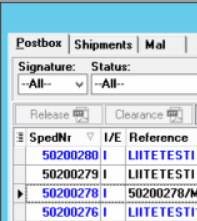
Open the shipment in Postbox.
-
Select the shipment you want to send documents for.
-
In the top menu, click Send documents.
-
Choose Send attachment(s).
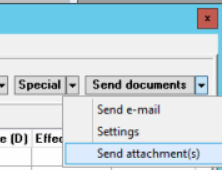
Only documents that are scanned or attached to the shipment and have a document type will be sent.
Step 2: Check and edit attachment details
The Attachment setup window will open.
For each attached document:
-
Select the document from the list.
-
Verify or fill in the following fields:
-
Title (optional)
-
Document type
-
Use N380 for invoices.
-
-
Description (optional)
-
Language (if required)
-
-
Click Save after making changes.
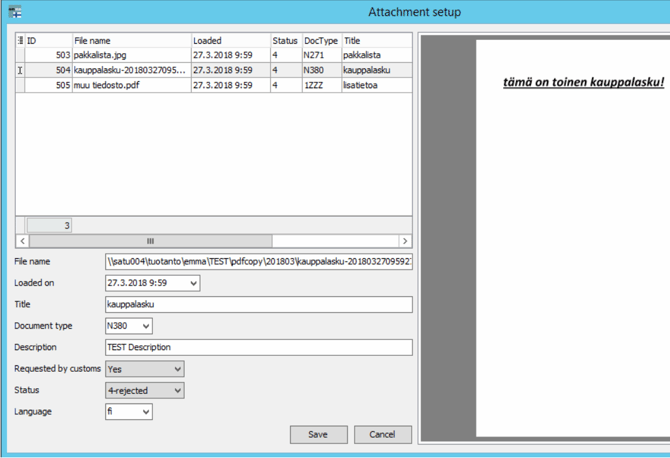
⚠️ Documents without a valid document type will not be sent.
Step 3: Ensure documents are added to “Additional documents”
Only documents added under 44. Additional documents can be selected and sent.
-
Open 44. Additional documents on the shipment.
-
Make sure the relevant documents are listed there.
-
Typical examples:
-
N380 – Invoice
-
N740 – Other supporting documents
-

If multiple documents are added in field 44, you will be able to choose between them when sending.
Step 4: Send the documents
-
Once all required documents are correctly set up, click Save.
-
The documents will now be sent to Customs automatically.
Tips
-
Always double-check that invoices use document type N380.
-
Use clear titles and descriptions to make document handling easier for Customs.
-
If a document is rejected, review the document type and required fields before resending.