.png?width=300&height=100&name=emma%20logo%20santa%20hat%20(4).png)
For AES exports, you can configure a platskod and export office as default settings for a customer or exporter.
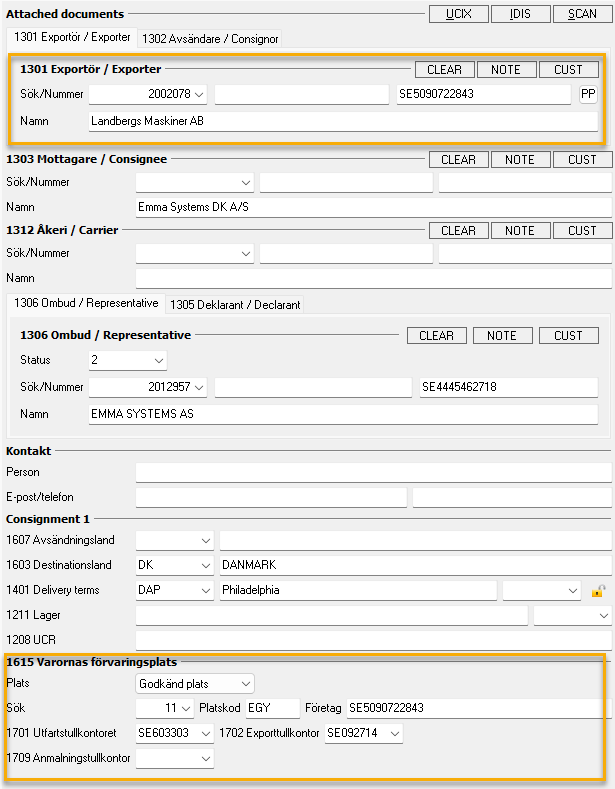
You can enter the “Platskod” and EORI directly in the declaration. To save these details as the exporter’s default settings, follow the instructions below.
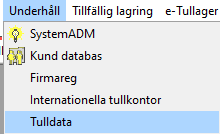
To begin, you will need to establish and create the "Platskod". Find Underhåll menu and select Tulldata to proceed.
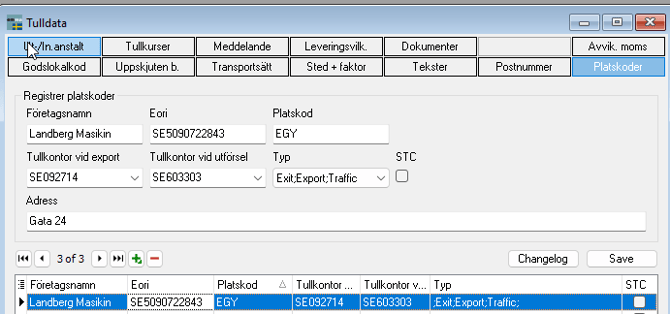
Navigate to the "Platskod" tab located on the right side. Here, you can register a new "Platskod" by clicking the green add symbol.
Please enter the business name, EORI, and "Platskod" as required. Additionally, if desired, you may include the customs office for exit and declarations to enhance your export documentation.
You can create multiple "Platskode" entries for the same EORI if there are different addresses, for example.
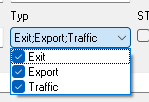
Select the appropriate Type , which may include options such as Exit, Export or Traffic.
Export: It is possible to reference from an AES declaration, which will automatically apply the code C+X as the default option (Godkänd plats for export).
Exit: It is possible to reference from an IE507 and IE590, which will automatically apply the code C+X as the default option (Godkänd plats for export).
Traffic: It is possible to reference from an IE507 and IE590, which will automatically apply the code A+X as the default option (Trafikktilstånd).
Then select STC if applicable. STC (Single Transport Contract) is a streamlined process that allows for the submission of information in just two steps. To utilize STC, you must have a comprehensive transport document, and it can be applied to various modes of transportation, including maritime, air, rail, and postal services.
For additional information regarding STC, we encourage you to consult the Swedish Customs Guide, which includes comprehensive details and instructional videos.:
Next, enter the address and click the SAVE button to complete your entry. To ensure the "Platskod" is accessible in Customer databaselandbe, please restart Emma.
When you choose a "Platskode" for the customer, you can locate the "Platskod" field at the bottom right corner of the interface.
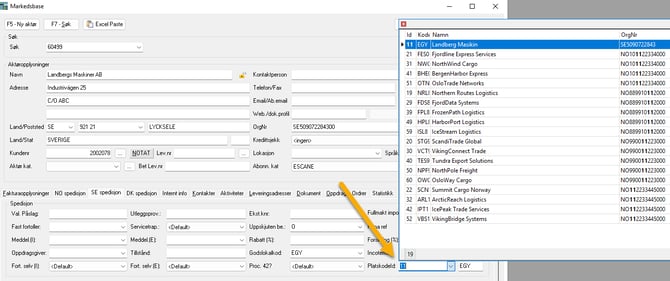
It should look like this in the customer database:
