.png?width=300&height=100&name=emma%20logo%20santa%20hat%20(4).png)
Available in EMMA version 418 · New requirements from 1 November 2026
This guide explains where to enter product identifiers and additional reference codes in EMMA, and how to review the handling fee for Swedish import declarations.
Before you start
From 1 November 2026:
- Product identifiers become mandatory for distance-sale consignments imported from outside the EU with an intrinsic value of EUR 150 or less. For F48/F53 declarations, check the requirements for the commodity code in the customs tariff.
- The Union handling fee applies to eligible distance sales from outside the EU, regardless of the value of the goods.
Have the seller’s and manufacturer’s product numbers available before completing the declaration.
Where do the codes go?
EMMA displays shortened field numbers. For example, 1203 corresponds to customs data group 12 03 — Supporting documents.
| Information | Field in EMMA | How it is entered |
|---|---|---|
| F48 or F53 | 1110 — Additional procedure | Additional procedure code |
| C127, C128 and C129 | 1203 — Supporting documents | Code with type DOC and the product identifier as its reference |
| Y081 and Y126 | 1204 — Additional references | Code with type REF |
| F00 | 1403 — Duties and taxes | Handling fee in the calculation |
The document and reference codes appear together in the combined document/reference tab for the selected goods item.
1. Check the additional procedure — 1110
Open Goods items and select the relevant item.
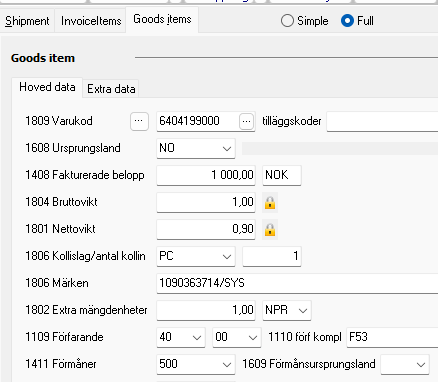
Check 1110 — Additional procedure:
| Code | Use |
|---|---|
| F48 | Distance sales under IOSS |
| F53 | Non-IOSS distance sales of consignments with an intrinsic value of EUR 150 or less |
The example uses F53.
Check the buyer and importer details on the Shipment tab as well. A company shown as the importer does not by itself mean that the goods are outside the distance-sales rules.
Additional procedure F53 in a non-IOSS distance-sale declaration.
2. Enter or check the product identifiers — 1203
With the goods item selected, open the combined document/reference tab below the item list.
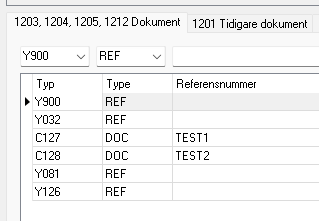
Enter or check the following codes using type DOC:
| Code | Reference to enter |
|---|---|
| C127 | The seller’s product or article number |
| C128 | The manufacturer’s internal product or article number |
| C129 | A standardised manufacturer identifier, such as an EAN |
Where the product identifier requirement applies, C127 and C128 are mandatory. C129 must be provided when available.
If the product has no standardised identifier
If C129 is unavailable and the exception is permitted, enter Y081 using type REF. This is reported under 1204 — Additional references.
First check whether the identifier exists. An empty field in imported data does not necessarily mean that the product has no standardised identifier.
For imported declarations using F48 or F53, EMMA automatically adds Y081 when C129 is missing and replacement is permitted. Review the code before submitting.
Y081 replaces C129 only. C127 and C128 are still required.
Example entries where C127 and C128 are supplied and Y081 is used instead of C129.
3. Check Y126 — 1204
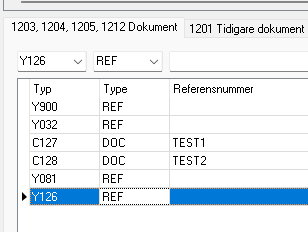
Y126 identifies distance sales covered by the handling fee. It is entered using type REF and reported under 1204 — Additional references.
In the example, the document/reference table contains:
| Code | Type |
|---|---|
| Y126 | REF |
EMMA adds Y126 automatically for applicable B2C declarations. If a warning asks you to assess whether it applies, check whether the goods were sold through distance selling and add the code where required.
For H7 declarations using F48 or F53, check that Y126 is present on every goods item.
EMMA does not add Y126 automatically when C08 for gifts is present. The product identifier requirement does not apply to gifts.
4. Review the handling fee — 1403
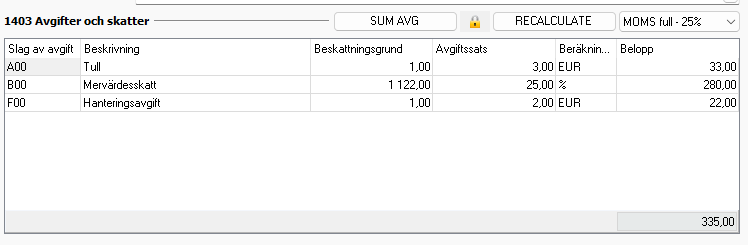
On Goods items, review 1403 — Duties and taxes, labelled Avgifter och skatter in the screenshot.
The H1 example shows three separate charges:
| Code | Charge |
|---|---|
| A00 | Customs duty |
| B00 | VAT |
| F00 | Union handling fee |
The handling fee is EUR 2 per declared goods item, rather than per physical unit. It is separate from customs duty.
In the test screenshot, F00 is displayed as SEK 22. This is the converted amount used in that test, not a fixed SEK fee.
Check the VAT treatment
- Non-IOSS, as in the F53 example: The handling fee is included in the VAT taxable amount.
- IOSS: No import VAT is calculated on the handling fee. The handling fee itself still applies.
Review the calculation after correcting information that affects the charges. The screenshot shows the RECALCULATE button above the calculation table.
For H7 declarations, the handling fee follows the low-value declaration rules. The F00 table shown here illustrates H1.
Handling fee and VAT calculation in the non-IOSS H1 test example. Amounts depend on the declaration and applicable exchange rates.
5. Validate and correct the declaration
Validate the declaration before submitting it. If an error concerns the product identifiers or additional references, return to the relevant goods item.
| What needs correcting? | Where to check |
|---|---|
| Missing seller’s product number | 1203 — C127 / DOC |
| Missing manufacturer’s product number | 1203 — C128 / DOC |
| Missing standardised identifier | 1203 — C129 / DOC, or 1204 — Y081 / REF where applicable |
| Missing distance-sales reference | 1204 — Y126 / REF |
| Incorrect additional procedure | 1110 — F48 or F53 |
| Handling fee or VAT calculation | 1403 — Duties and taxes |
Correct the information and validate again.
Before submitting, check that the product references match the goods, any automatically added Y-codes are appropriate, and the handling fee and VAT treatment are correct.
Further information
External guidance in Swedish: