.png?width=300&height=100&name=emma%20logo%20santa%20hat%20(4).png)
The module collects and organizes declaration data so that you can easily analyze, filter, and compare information across periods, brokers, and product types.
By identifying errors and discrepancies early, the Analysis module helps ensure correct payment of duties and taxes, accurate calculation of import VAT, and a complete audit trail. This reduces the risk of financial losses, reassessments, and penalties, while also providing a solid foundation for documentation, reporting, and continuous improvement of customs and compliance processes.
The Analysis module is particularly useful for companies that handle customs duties and excise duties on imported goods, such as food businesses, retail, textile, and other importers that require strong control over declarations and item-level details.
Why is the Analysis module important?
Errors in declarations can lead to paying too much or too little in duties and taxes. In both cases, this affects the basis for import VAT and may create additional costs and extra work related to corrections and documentation.
With the Analysis module, you gain better control and can work more proactively. The module helps you identify errors before they become costly, uncover unnecessary duty costs, verify item lines and tax bases, and ensure traceability and documentation for audits or controls.
Prerequisites for using the Analysis module
To get full value from the Analysis module, declarations must be delivered with XML data to Emma Compliance from the customs representative.
If declarations are only delivered as PDF, not all details will necessarily be visible in the module, and some fields may be empty. In many countries (such as Norway), a large share of declarations is delivered as XML, but this may vary between countries and customs representatives.
In countries where statistical files are available, these will be used to enrich missing data from received PDFs.
To get an overview, you can use the function Analysis of declarants, which shows which customs representative deliver XML and which deliver PDF.
How to work in the Analysis module
Go to Functions and select:
“Details – item/duty/document”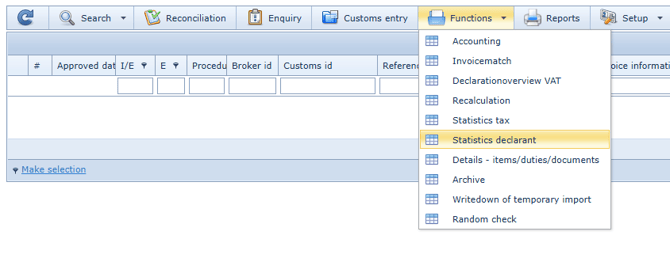
Start by selecting a period using the date filter, in the same way as in the main module.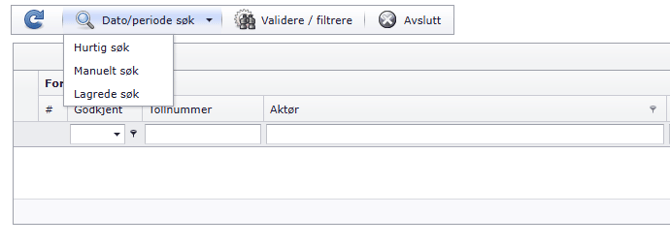
You can then sort by clicking column headers.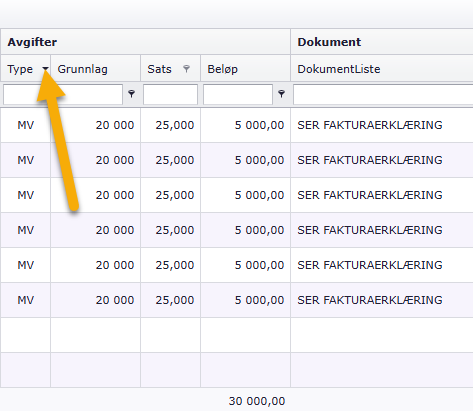
Or use filters and search to identify discrepancies or perform quick checks, for example on:
- National duty and tax codes (e.g. TL, RT, SM, FK or A00 in Norway – codes vary by country)
- Specific tariff numbers
- Goods with unexpected changes in duties and amounts
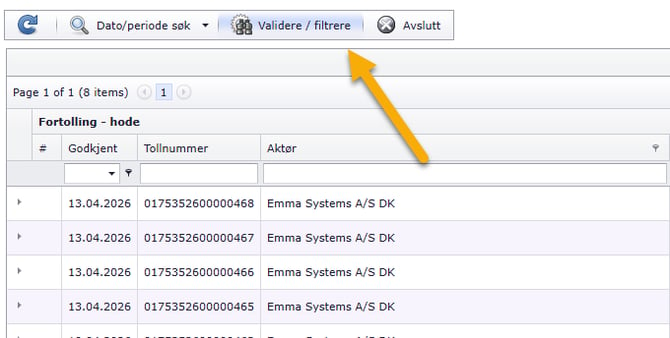
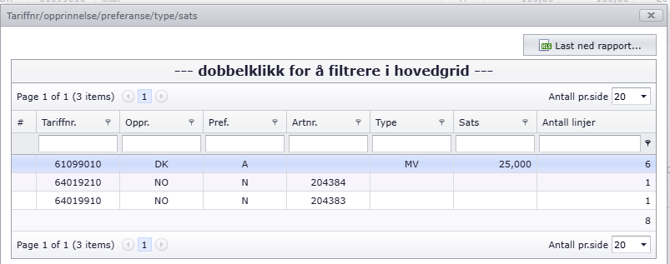
This makes it easy to identify patterns and recurring issues.
In daily use, the Analysis module is often used for targeted controls such as:
- Verifying duty and tax calculations
- Detecting errors that lead to over- or underpayment
- Checking that item-level details are correct
- Ensuring documentation is complete for corrections, refunds, or audits
The module can also be used to assess data quality from customs representative, by identifying who delivers XML with complete data and who delivers PDF with limited detail.
If needed, you can export selections to Excel or other formats for internal documentation, further analysis, and follow-up.
You can also customize the view by adding or removing fields and saving your own layouts, so the module is tailored to your control routines and workflows.
Additional value with item number
If the customs representative can provide item numbers in XML, this enables even better control and analysis.
Item numbers improve traceability and statistics, make it easier to control at product level, reduce the risk of manual errors, and can contribute to more efficient customs clearance.
We therefore recommend discussing this with your customs representative and requesting item numbers in XML to get maximum value from the Analysis module.
Recommended basic routines
To ensure correct declarations and reduce the risk of errors in duty and tax calculations, we recommend establishing fixed control routines in the Analysis module. A good practice is to follow up monthly or quarterly, depending on volume and complexity.
Check country of origin
Country of origin can affect customs treatment and calculations, and incorrect registration may lead to unnecessary costs or risk of reassessment.
- Filter by country of origin and check goods that stand out
- Look for the same product type with different countries of origin across periods
- Follow up with the customs representative if country of origin is missing or varies without explanation
Check classification (tariff number)
Classification is essential for correct duties and excise taxes. Incorrect tariff numbers can lead to incorrect payments and discrepancies during audits.
- Filter by tariff number and identify unusual or new classifications
- Compare periods to detect changes in classification for similar goods
- Follow up recurring discrepancies where the same product is classified differently
Check value (customs value/basis)
The value is a key factor in calculating duties, excise taxes, and import VAT. Small errors can have significant impact over time.
- Look for large deviations in value for similar product types
- Check unexpected changes in currency basis or total value
- Use export to Excel when needed for internal documentation and comparison
Follow up recurring issues and discrepancies
Recurring errors often indicate missing routines or incorrect data in the declaration flow.
- Filter by duty/tax codes (note: codes are country-specific)
- Identify which custom representative or product types are repeatedly involved
- Use findings to implement improvements and enhance data quality
Register discrepancies - request recalculation/correction
Use Register discrepancy on the declaration and submit a request for recalculation or correction to the relevant customs representative.
-
Declaration overview: Why you should monitor it
-
What is a declaration overview? Common errors to look for, and how you can use Emma Compliance to gain control over your customs declarations.