.png?width=300&height=100&name=emma%20logo%20santa%20hat%20(4).png)
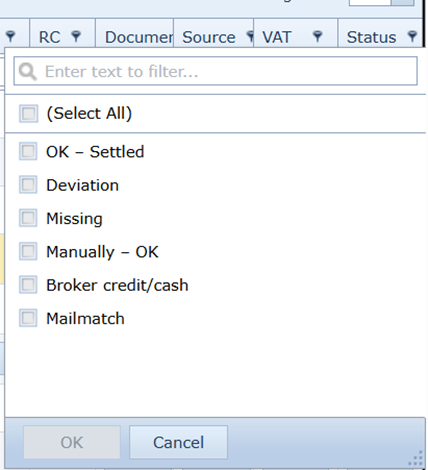
OK - Settled (green status)
The declaration has been reconciled against imported statistical data, and both statistical value and duties match between the declaration and the official customs data.
This means that the declaration has been verified and is consistent with official data.
Deviation (yellow status)
The declaration has been reconciled against imported statistical data, but there are differences in statistical value or duties between the declaration data and the customs authority data.
This must be reviewed by the user.
Missing (red status)
The declaration has not been reconciled against imported statistical data.
This may be due to, for example:
- Declaration received, but statistical data not imported
- Export cases (e.g. Sweden) where exit confirmation has not been received
- Statistical data imported, but declaration not received (listed as missing)
Manually - OK (green status)
The declaration has been manually confirmed as OK by the user.
When this status is set:
- The declaration is removed from any missing list
- The declaration is considered verified by the user
Broker credit/cash (blue status)
This status is typically used when the customer has a customs credit arrangement, or when duties and VAT are not handled as a disbursement by the customs representative.
It helps identify declarations where the payment responsibility lies with the customer.
Mail match (green or black status)
When a declaration has a green status with a black border, it means that documents have been linked to the declaration via the Mail match function in Inbox.
This implies that attachments are stored on the declaration or the declaration is removed from any missing list.
The system does not interpret the content of the documents. Users should therefore perform spot checks to ensure that the correct documentation is linked to the declaration.