.png?width=300&height=100&name=emma%20logo%20santa%20hat%20(4).png)
Step 1: Find the declaration in the Postbox overview
-
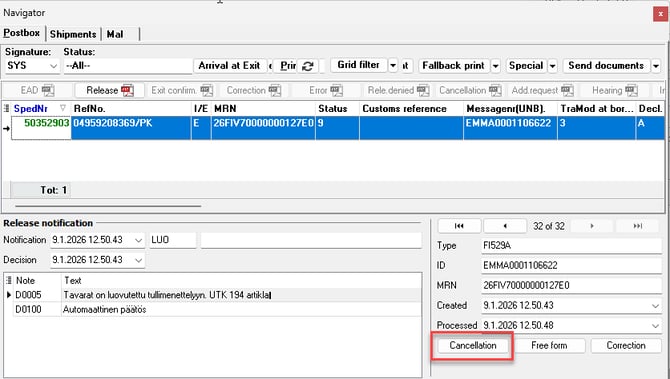
Go to the Postbox overview.
-
Search for and select the relevant declaration.
-
Click the Cancellation button located in the bottom right corner.
Step 2: Submit an invalidation request
-
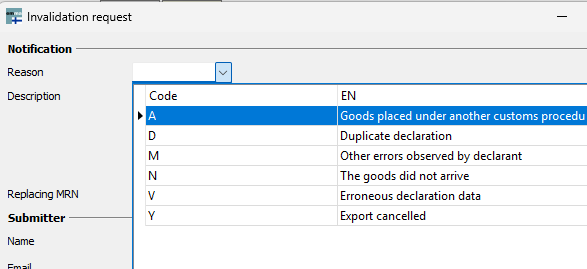
The declaration will open, and the Invalidation Request window will appear automatically.
-
Select the appropriate reason code.
-
Enter a more detailed reason for the cancellation in the field below.
-
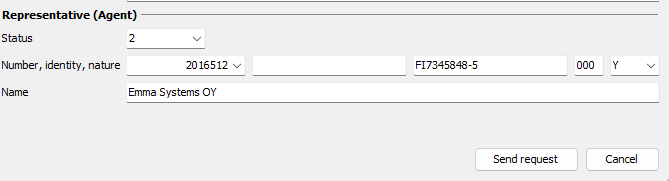
When all required information is completed, click Send request.
Step 3: Cancellation is sent to Customs
-
The cancellation request is now submitted and will be sent to Finnish Customs (Tulli) for processing.
-
The status of the declaration will be updated once a response is received.
If the declaration has been moved to Shipment and archived
If the declaration has already been moved to a Shipment and archived, it must be moved back to the Postbox before it can be cancelled.
-
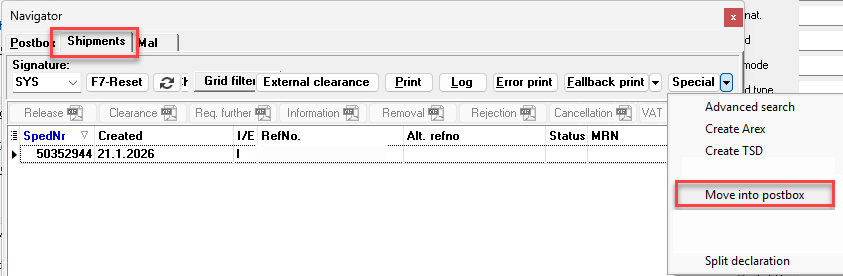
Go to the Shipment.
-
Select (mark) the relevant consignment.
-
Click Special operations in the top right corner.
-
From the drop-down menu, select Move into Postbox.
Once the declaration has been moved back to the Postbox, you can proceed with the cancellation as described above.