.png?width=300&height=100&name=emma%20logo%20santa%20hat%20(4).png)
For air freight, it is important to determine whether the shipment is transported under a Master Air Waybill (MAWB) or as a direct consignment.
This determines whether the transport should be linked to a Master Consignment or directly to a House Consignment.
Before you startBefore submitting an air consignment, you must know whether the Air Waybill (AWB) represents:
- a Master Air Waybill (MAWB) with one or more underlying House Consignments; or
- a direct Air Waybill, where the House Consignment is linked directly to the transport.
This is important because different transport document types are used:
| Structure | Transport document type | Connection |
|---|---|---|
| Master with underlying House Consignment(s) | N741 – Master Air Waybill (MAWB) | Transport → Master → House |
| Direct House Consignment | N740 – Air Waybill | Transport → House |
The AWB reference and transport document type must correspond with the information reported on the transport.
1. MAWB with underlying House Consignments
Use this structure when the freight is transported under a Master Air Waybill (MAWB) and there are one or more House Consignments below the Master.
The structure is:
Air Transport → N741 / MAWB → Master Consignment → House Consignment(s)
The MAWB is used to establish the connection between the Air Transport and the Master Consignment.
In Emma
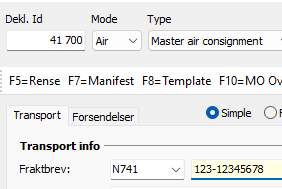
Create the Master Consignment and enter the MAWB in the relevant AWB/transport document field.
The MAWB must be reported as:
N741 – Master Air Waybill
The same MAWB reference must be reported on the Air Transport by the party responsible for the transport information.
The House Consignment(s) are then connected through the Master Consignment.
Example
Air Transport:
N741 – 123-12345675
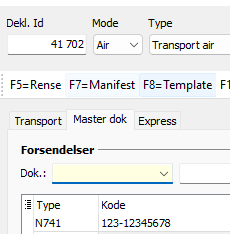
Master Consignment:
House consignment:
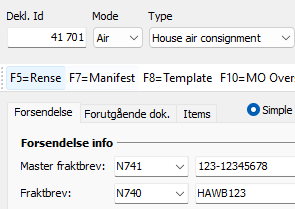
The resulting structure is:
Transport → Master → House
2. Direct Air Waybill – without a Master Consignment
Not all air consignments require a Master Consignment.
If the House Consignment is transported directly under its own Air Waybill, it can be connected directly to the Air Transport.
The structure is:
Air Transport → N740 / AWB → House Consignment
There is no Master Consignment between the Transport and House.
In Emma
Create the House Consignment and enter the relevant AWB as the transport document reference.
NB! Leave Master fraktbrev field blank
The AWB must be reported as:
N740 – Air Waybill
The same AWB must be reported as N740 on the Air Transport.
Example
Air Transport:
N740 – 123-12345675
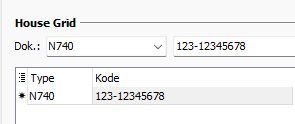
House Consignment:
N740 – 123-12345675
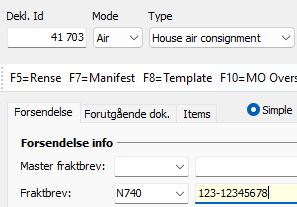
The resulting structure is:
Transport → House
Important: N740 and N741 must correspond
One of the most important parts of the air freight process is ensuring that both parties have the same understanding of the AWB.
For example, a connection will not be established correctly if the Ground Handler reports:
N741 – 123-12345675
as a Master Air Waybill, while the freight forwarder submits the same AWB as:
N740 – 123-12345675
for a direct House Consignment.
Although the AWB number is the same, the messages describe two different consignment structures:
N741
Transport → Master → House
N740
Transport → House
If you are unsure whether an AWB is a MAWB or a direct AWB, this should be clarified with the airline or Ground Handler before submitting the consignment in Digitoll.
Important: The freight forwarder and the party reporting the Air Transport must use the same AWB structure. Knowing the AWB number alone is not sufficient – you must also know whether it is being reported as a Master Air Waybill or a direct Air Waybill.
AWB formatting must match
The AWB reference used for the consignment must correspond with the AWB reported on the transport.
Pay particular attention to the formatting of the AWB, including the use of hyphens.
For example:
123-12345675
and
12312345675
should not be assumed to represent an identical reference for the purpose of establishing the connection.
We recommend using the AWB exactly as it has been reported by the airline or Ground Handler.
Checking the connection in Emma
You can use MO Overview to check whether the air consignments have been correctly connected to the transport.
From the transporter's perspective:
Open the relevant Air Transport in MO Overview. Here you can see:
- the status of the Transport
- the Master Consignments connected to the Transport
- any direct House Consignments connected to the Transport
- the connection and Customs status of the consignments
This allows the transporter to verify that the expected MAWB/Master or direct House has been connected to the Air Transport.
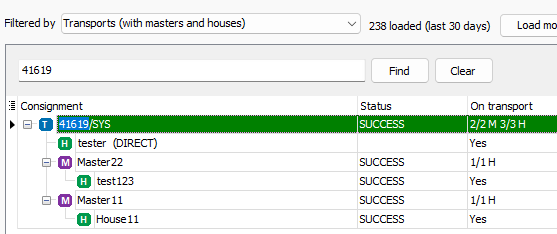
From the freight forwarder's perspective:
A freight forwarder can check their submitted Master Consignment or direct House Consignment in MO Overview.
The On transport column shows whether the consignment has been connected to a Transport:
- Yes – the consignment is connected to a Transport
- No / blank – no confirmed Transport connection is currently shown
This is particularly useful when the Transport has been submitted by another party, such as the airline or Ground Handler.
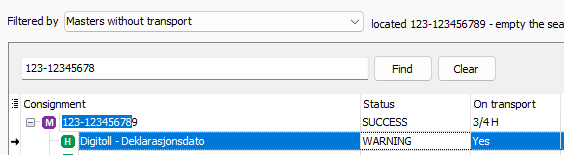
Note: Receiving an MRN confirms that the message has been received, but does not by itself confirm that the consignment has been connected to the expected Transport. Use MO Overview to check the connection.
Common issue: the AWB exists, but the consignment is not connected
If the AWB number appears to be correct but the consignment is not connected to the Air Transport, check the following:
- Has the Air Transport been submitted?
The connection can only be confirmed once the Transport message has been submitted and processed by Norwegian Customs. For air freight, this may happen very close to departure. Until then, the connection may not be visible or confirmed in MO Overview. - Is the AWB reported as N741 (MAWB) or N740 (Air Waybill/direct consignment) on the Transport?
- Has the correct structure been created in Emma?
- Is a Master Consignment expected, or should the House be connected directly to the Transport?
- Is the AWB written exactly the same way, including hyphens and formatting?
- Has the Ground Handler/airline reported the AWB using the same structure as the freight forwarder?
If the parties have classified the same AWB differently, this must be clarified before the messages can be connected correctly.
Summary
For air freight, remember these two structures:
Master Air Waybill
Transport → N741 / MAWB → Master → House
Use this when there is a Master Air Waybill with underlying House Consignments.
Direct Air Waybill
Transport → N740 / AWB → House
Use this when the House Consignment is connected directly to the Air Transport without a Master.
The AWB number, AWB type and structure must correspond with what has been reported on the Air Transport.
More information from Norwegian Customs
For further information about responsibilities between airlines, Ground Handlers, freight forwarders and declarants, see the Norwegian Customs guidance:
Flyfrakt og Digitoll: roller og ansvar ved digital melde- og opplysningsplikt
Norwegian Customs – Air freight and Digitoll: roles and responsibilities