.png?width=300&height=100&name=emma%20logo%20santa%20hat%20(4).png)
Sending an Advisory by email
Note: A licence and configuration are required to use this feature. Please contact Emma Support for setup.
This feature is useful when the recipient is not set up for Emma Connect, or uses another system that does not support Advisory messages.
Instead of sending the Advisory directly between systems, you can send it to an email address of your choice. The recipient can then respond using a web form without needing access to Emma.
If you cannot find a contact address for the recipient of the Advisory in the Address tab, select the E-mail tab instead. This allows you to send the Advisory to an email address of your choice.

The Advisory is completed as usual and sent by email.
The recipient receives an email containing a summary of the Advisory and a link to a web form where they can respond. The email is sent from the sender's email address, and anyone with access to the link can respond to the Advisory.
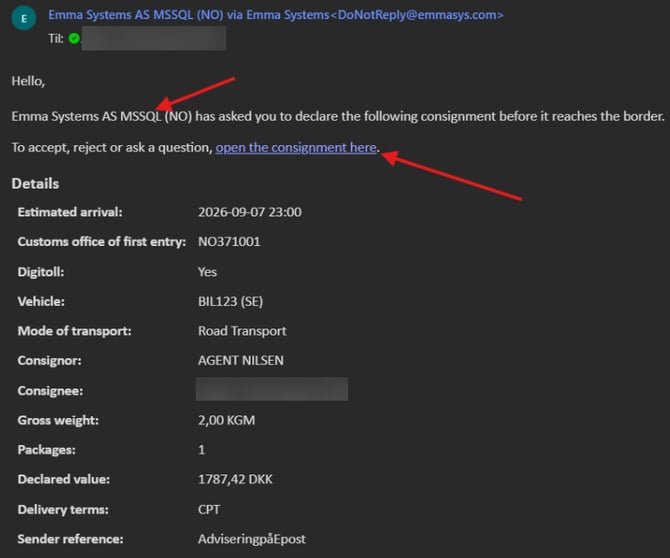
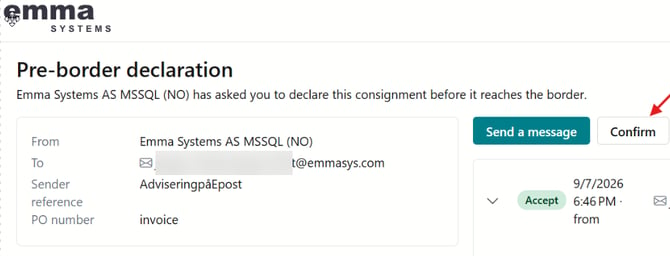
The recipient can accept the Advisory and use the dialogue to send messages and share documents, just as with an Emma-to-Emma Advisory.

The sender can follow the Advisory in Message Exchange, in the same way as any other Advisory:

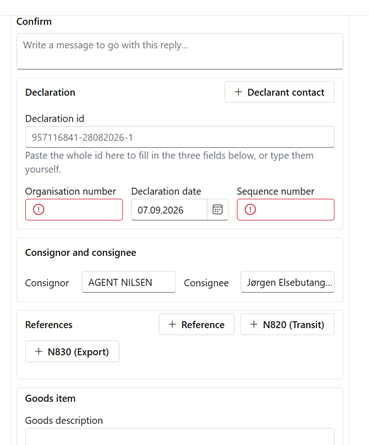
When the recipient is ready to respond, they click Confirm and enter the Declarant ID, date and sequence number.
Emma validates the Declarant ID and allows the recipient to include relevant documents or additional information with their response.